
Know if your trading robot is real before your money finds out.
Unique, powerful tools that check, test, track and protect any MetaTrader 5 trading robot: forex, gold or indices, bought anywhere. Built by a trader with over 20 years in the markets.
“Read independent buyer reviews from the MQL5 Marketplace
- !Backtest looks curve-fit to the pastEA Auditor
- !Edge disappears on prices it has never seenEA Overfitter
- !Broker costs eat most of the profitEA Slipstream
One SafireFX tool costs less than one bad robot. And it's yours for life.
MT5 robots often cost $400, $600, even over $1,000. Buy the wrong one and you pay twice: once for the robot, then again in the money it loses on your live account. A SafireFX tool costs less than that first payment, works on every robot you'll ever look at, and keeps getting updated free of charge for as long as you trade.
One bad robot
A SafireFX tool
Finally, a portfolio of robots you can trust.
Checking one robot saves you money once. Doing it every time changes how you trade: the bad robots never reach your account, and only the ones that prove themselves are left. That's how you build a strong, robust portfolio of robots that have earned their place on your live account, and know exactly how each one is doing.
Avoid just one bad robot and the tools have paid for themselves, then keep protecting your money on every robot after that.
See the bundlesIf it trades on MetaTrader 5, these tools work with it
Forex, gold, indices, oil or crypto. Bought on MQL5, from a website, a Telegram group, or built yourself. It doesn't matter where your robot came from.
What's a trading robot?
A program that runs inside MetaTrader 5 (MT5) and places trades for you automatically, day and night. You'll also hear them called EAs or Expert Advisors. It's the same thing.
Why test it first?
Every seller shows you their best backtest. A backtest can be tuned to fit the past, run on perfect prices, or leave out half the story. These tools show you what the screenshots don't.
No coding, no maths
Drop the tool onto an MT5 chart, point it at your robot or its backtest, and read the answer in plain English: what's good, what to watch, and what to do next.
Don't know what the numbers mean? You don't have to.
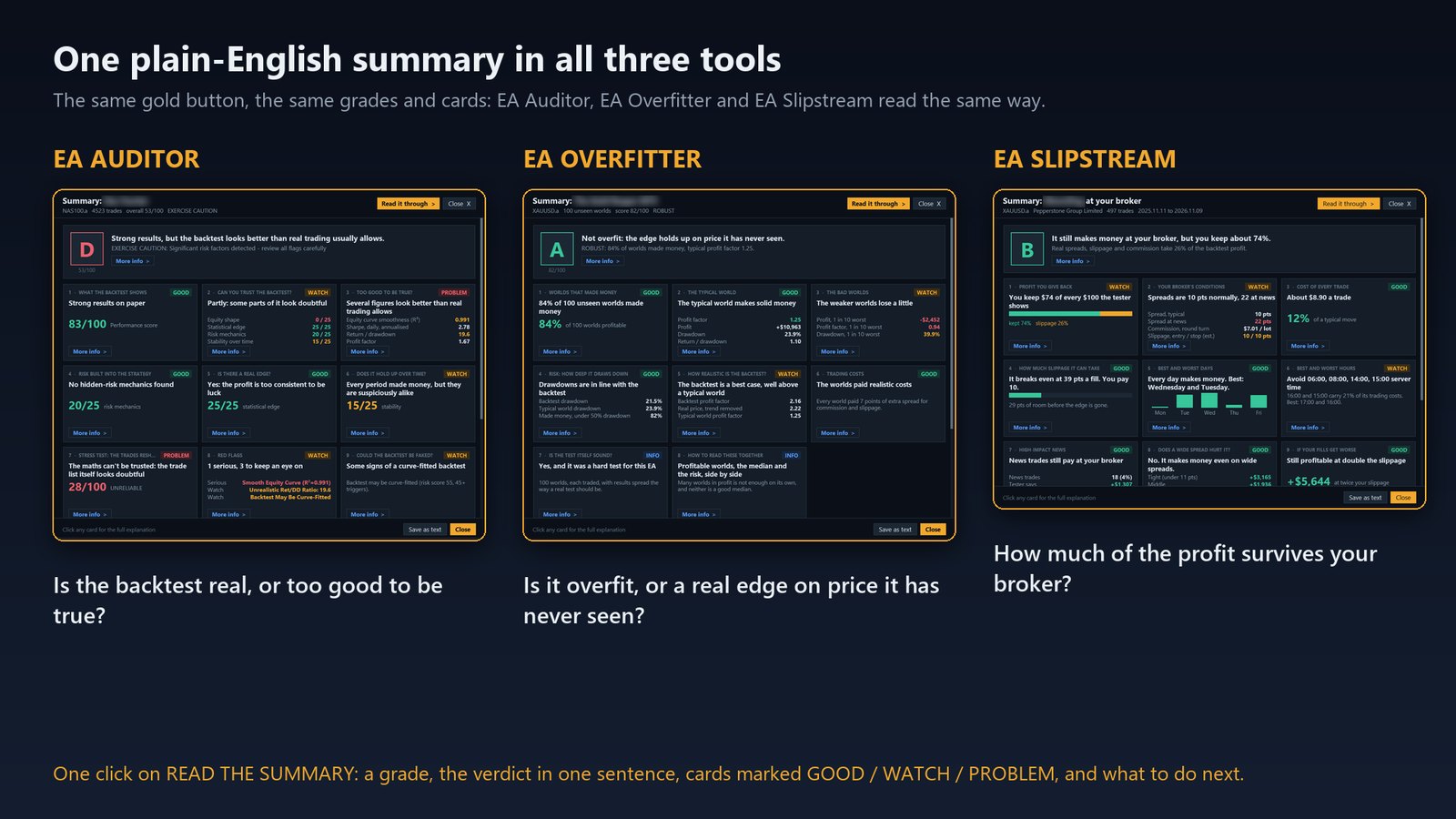
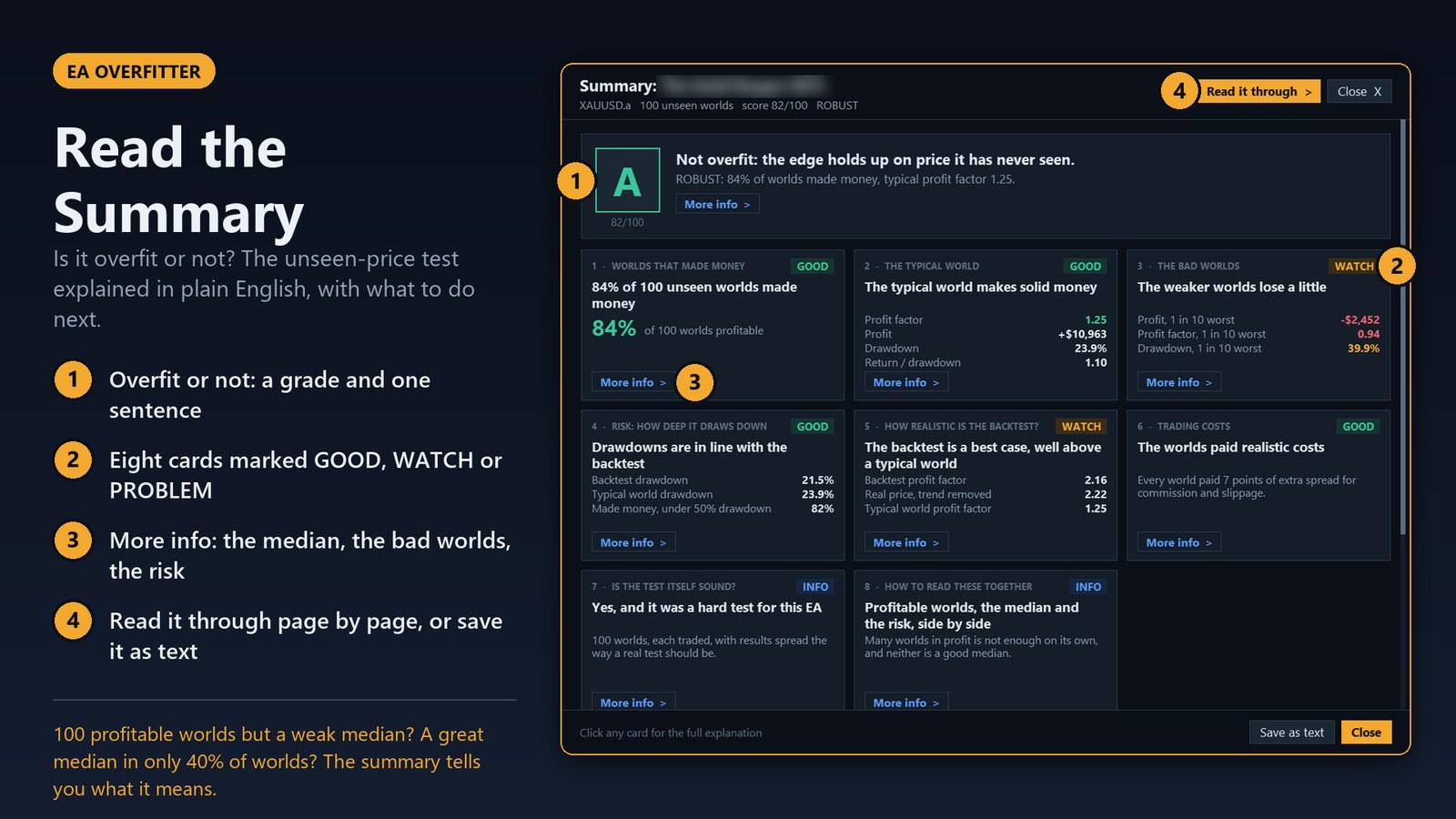
Profit factor, drawdown, Sharpe ratio... Backtests are full of numbers most people were never taught to read. That's why EA Auditor, EA Overfitter and EA Slipstream each have one powerful gold button: READ THE SUMMARY. One click interprets every number for you and turns it into an easy-to-follow scorecard on how the robot performs and what the tool found.
- A grade from A to F and the verdict in one sentence: good robot or bad robot?
- Every number explained on cards marked GOOD, WATCH or PROBLEM
- What to do next, as a short plain-English list
 Running live already? AlgoRadar's one-click Portfolio Review does the same for your live portfolio: it tells you which robots to take out, which to cut back and which have room to grow.
A tool for every moment you trust a robot with your money
From the day you see a backtest to the day it's running on several accounts, each SafireFX tool answers the question you're asking right then.
One toolkit. One question: can I trust this robot?
Pay once and they're yours for life, with free updates. Each paid licence runs on one MT5 account, live or demo, and you can swap it yourself up to 3 times a month.
Independent reviews, straight from the MQL5 Marketplace
I'm really proud of these tools, but don't just take my word for it. Here's what traders who bought them on the MQL5 Marketplace have said, word for word, with their star rating and MQL5 username exactly as they appear there.
Pick your mission
The tools are built to work as a set. From your first robot check to running a whole fleet, get them together and save.
Buy once. Use it on your account. Always the latest version.
No MQL5 account needed. Pay by card or PayPal, and you're running in minutes.
Pick your tools and pay
Secure checkout by Payhip, with card or PayPal. Your download and a member-area login link arrive by email straight away. No password to remember.
Add your MT5 account number
In your member area, type in the account you'll use, live or demo. Changed broker? Swap it yourself, up to 3 times a month.
Download and run
Download the latest version and drop it into MT5. When there's an update, you'll get an email and the new file is waiting for you.
Building or selling robots? Stress-test them before your customers do.
Most developers only ever test against past price history. A strategy can look perfect on the data it was built on and still fall apart on prices it has never seen. These tools let you test your robot the way the live market will.
A robot that keeps working after launch earns better reviews, fewer complaints and more sales. Whether you sell your robots or trade them yourself, you'll know your edge is real before real money is on the line.
See the Launch Kit
I got tired of being lied to by backtests and wasting thousands of dollars on robots that didn't work. So I built the tools to catch them.
I've traded for over 20 years and run trading robots on real accounts every day. I've bought the "perfect" backtests, watched them fall apart live, and learned the hard way that a great equity curve can mean almost nothing.
Before you buy a robot, all you usually get is a backtest, which can be inflated or manipulated, and a live signal you can't be sure you can trust. Then you pay and hope for the best. Most of the time, that's as far as anyone looks. My tools go much deeper. They test a robot on prices it has never seen, check the price history behind a backtest for bad data and hidden tricks, catch curve-fit and inflated results, and turn it all into clear warning flags and a unique score. They're built on all those years in the markets and a real understanding of how algorithmic trading works, and of how robots get sold, the genuine ones and the scams. I'm proud of what I've been able to develop to help me and other traders, many of whom have greatly benefited from them.
Then, with a handful of robots running across several accounts, I hit the next problem: keeping track of them all. Most portfolio analysers make you export your history, dig through MT5's data folders and look at it offline. I wanted every robot, on every account, tracked live in front of me on my chart, with clear advice on which robots to cut back and which have room to grow. So I built AlgoRadar.
Every SafireFX tool started as something I needed for my own money: to see if a robot's edge is real, if a backtest is honest, what my broker really costs me, and which robots are actually paying. Now they're yours.
Steve, SafireFX

 Watch: How to tell if your forex robot is overfitted (1:22)
Watch these tools test real robots on YouTube
Every week on the SafireFX channel I put real MT5 trading robots through these tools, on screen, start to finish. You'll see exactly what each tool shows, how to read it, and how it can protect your money before you risk a cent.
 youtube.com/@safirefx
Quick tours: see each tool in a few minutes
All videos on YouTube →Questions people ask
What is a trading robot (an "EA")?
A trading robot is a program that runs inside MetaTrader 5 and opens and closes trades for you automatically. MetaTrader calls them Expert Advisors, or EAs for short. If you've bought a forex, gold or index robot for MT5, that's what you have.
Will it work with a robot I didn't buy on MQL5?
Yes. The tools work with any robot that runs on MetaTrader 5, wherever it came from: MQL5, another website, a Telegram group, a friend, or one you built yourself. Forex, gold, indices, oil, crypto: if it trades on MT5, it works.
I build robots. Are these tools for me?
Very much so. Whether you sell your robots or trade them yourself, EA Overfitter, EA Slipstream and EA Auditor let you stress-test a robot on unseen prices and real broker conditions, and check its backtest the way a buyer would, before launch. A robot that keeps working after launch earns better reviews and more sales.
Do I need an MQL5 account?
No. Buy here with a card or PayPal and download straight from your member area. If you prefer MQL5, the tools are on the MQL5 Marketplace too, but the bundle deals are only available here on the SafireFX website. The only time you'd need a free MQL5 account is to download a demo first.
How do I install it?
It takes about two minutes, and you only do it once on each computer or VPS.
- Download the tool from your member area. It's a single .ex5 file.
- Put it in MetaTrader 5. In MT5, click File → Open Data Folder, open MQL5 → Experts and copy the file in there.
- Refresh the list. Back in MT5, right-click Expert Advisors in the Navigator window and choose Refresh. The tool now appears in the list.
- Allow the licence address (paid tools only). Click Tools → Options and open the Expert Advisors tab. Tick Allow WebRequest for listed URL, double-click the empty line underneath, paste this address and press OK: This is how the tool checks your licence. It only sends your MT5 account number, nothing else.
- Drag the tool onto a chart and press OK. Make sure you're logged into the MT5 account you registered in your member area, and it starts straight away.
Each tool's full manual (on its page and in your member area) walks through every setting after that. News Sentinel is free and has no licence, so it doesn't need step 4.
How many accounts can I use it on?
Each licence runs on one MT5 account at a time, live or demo. You type the account number into your member area yourself, and you can swap it to a different account up to 3 times a month, with no need to email anyone. The new account starts working straight away and the old one switches off. If you ever need an extra swap, just email me. Running several prop firm challenges at once? PropGuard has to sit on each account, so you can add extra PropGuard accounts at a reduced price from your member area.
Why only one account per licence?
Because these aren't trading robots. A trading robot has to run on an account all day, every day. These tools you run when you need them: test a robot, read the result, done. That means a licence covering several accounts could easily be passed around a group of friends or a forum, and a tool built over years would end up shared for free. One account per licence keeps it fair for everyone who paid. And you don't lose anything: you only need the tool on one account to test a robot, and the robot you test can still run on as many accounts as you like. Change broker or account? Swap it yourself, up to 3 times a month. And if you have a specific need to run a tool on more than one account at the same time, just email me at safirefx.algo@gmail.com and we'll work something out.
How do updates work?
Updates are free. When a new version is released, you'll get an email, and the latest file is always waiting in your member area. Your account number carries over automatically.
Does it work on a VPS?
Yes, on any Windows VPS or PC. Just follow the install steps on the VPS too, including allowing the licence address in MT5. Remember the licence runs on the MT5 account you've registered, so log into that account on the VPS.
Can I try before I buy?
Yes. Free demo versions of the paid tools are available on the MQL5 Marketplace. If you don't already have one, sign up for a free MQL5 account, open my seller page there (Stephen J Martret), pick the tool and download the demo straight into MetaTrader 5. Demos run in MT5's Strategy Tester, so you can see exactly what the tool does before you pay. You can also watch every tool at work on real robots on the SafireFX YouTube channel, including a short tour of each one.
Can I buy more than one tool?
Yes. Each checkout is for one tool or one bundle, so if you want two separate tools, just buy one, then come back and buy the other. Use the same email address both times and they all appear together in your member area, under one login. Buying three or more? Have a look at the bundles first: they cover the most popular combinations in a single checkout and save you money.
Are there any discounts?
Yes. The best savings are the bundles: buy the tools together and save up to $176. They're available all year round, so there's no need to wait for a sale. From time to time SafireFX also runs a limited promotion, for example on Black Friday, and those codes are announced on the SafireFX YouTube channel. There are no other discount codes, so if you don't have a current one, the bundles are your best price. One discount per order: a code isn't added on top of a bundle price.
Can I get a refund?
No. These are digital tools you download and keep, so all sales are final and there are no refunds. That's exactly why there's so much to look at before you buy: a free demo of every paid tool on the MQL5 Marketplace, a short video tour of each one, and full robot tests on the YouTube channel showing how they work. Take your time, make sure the tool does what you need, then buy with confidence. If something doesn't work as described, email me at safirefx.algo@gmail.com and I'll help you get it running.
Stop guessing which robots to trust.
Get the full toolkit and check every robot before it touches your money.